
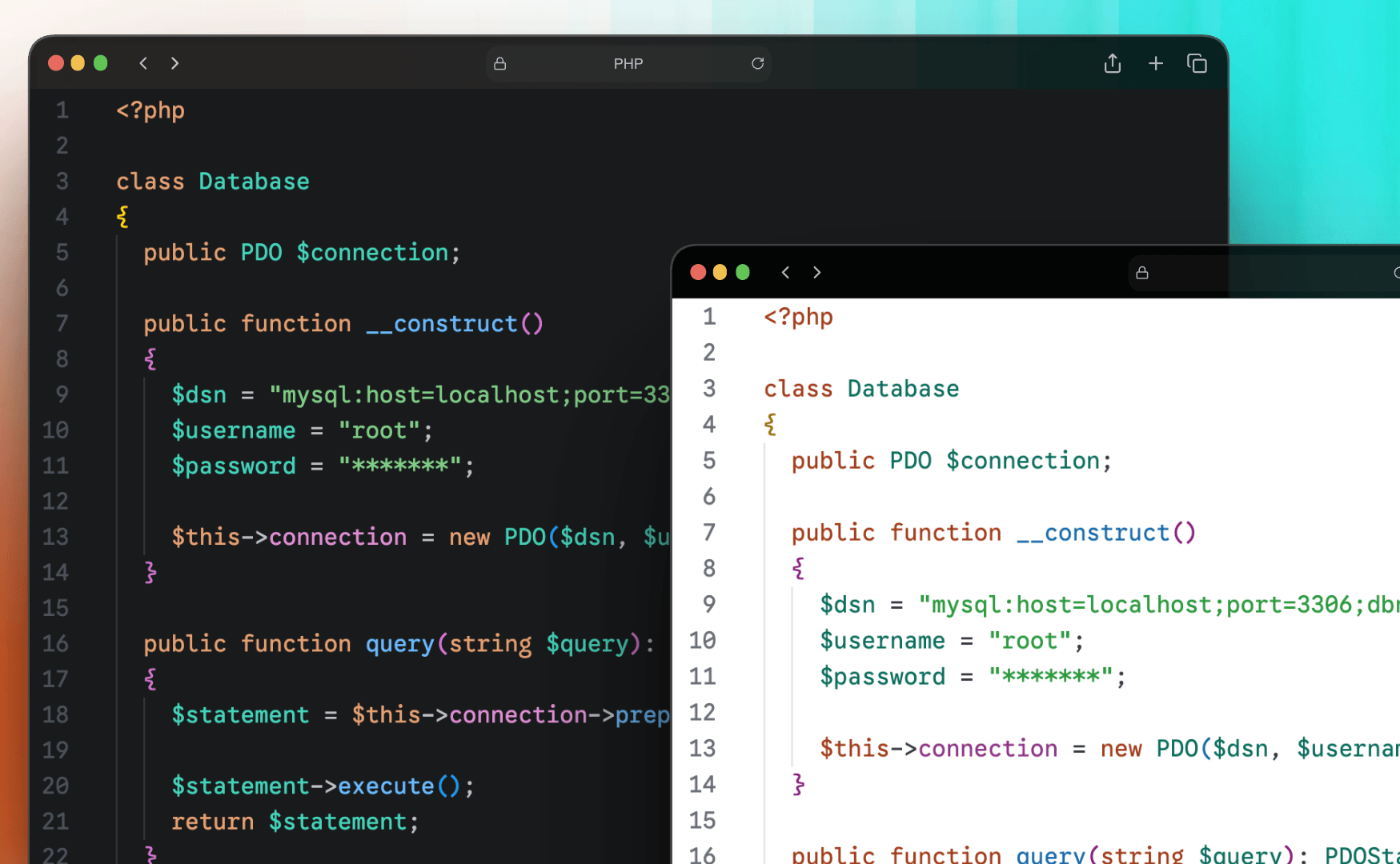
Eke Dark is a color theme for VS Code, with a JetBrains version in progress. I built it for two reasons.
First, I switch between VS Code and JetBrains IDEs a lot and wanted one visual language across both. Second, default JetBrains highlighting leaves local variables, parameters, and most properties at the plain foreground color. You end up with blocks of code where only keywords and strings stand out. Eke Dark gives every meaningful token its own color, so you can read the structure of code at a glance.
The UI takes cues from JetBrains' Islands theme: a two-tone split where the sidebar and panels sit darker than the editor, a calm palette, and a single teal accent (#4ECDC4) for the cursor, active tabs, focus borders, and buttons.
What's in it:
- Dark and Light variants, each with an optional Italic version for comments and parameters
- Distinct colors for variables, parameters, properties, and identifiers
- Property chains like user.profile.name use tints of one hue, so they read as a group while each link stays distinct
- Full semantic highlighting support through semanticTokenColors
- Gold, magenta, and blue bracket pair colorization
- Tuned for TypeScript, JavaScript, Python, Rust, PHP, CSS/SCSS, JSON, YAML, Markdown, and more
The colors are calibrated against Google Sans Code in the editor and Agave Nerd Font Mono in the terminal, but any monospace font with real italics works.
Install it from the VS Code Marketplace by searching "Eke", or grab the .vsix from the GitHub releases page. The theme is plain JSON with no build step, and contributions are welcome under the MIT license.
Syntax Palette (Dark)
| Element | Hex |
|---|---|
| Keyword / Storage | #E5A070 |
| Functions / Methods | #6BBAFF |
| String | #7FCC85 |
| Number | #3CC8D4 |
| Class / Type / Variable | #42D4BA |
| Property access | #79E3D2 |
| Constant / Key / Attribute | #D2A8FF |
| Comment | #7a7e85 |
| Decorator | #CCC76E |
| RegExp | #58D8E8 |
| Tag (HTML) | #6BB0EA |
Property access is a lighter tint of the variable color rather than a separate hue, so a chain
like user.profile.name stays one visual family while each link still reads as distinct. Where a
property is being _declared_ — an object literal key, a JSON key, an enum member — it takes the constant purple instead.
Installation
From the Marketplace
- Open the Extensions sidebar in VS Code (
Cmd+Shift+Xon macOS,Ctrl+Shift+Xon Windows/Linux) - Search for
Eke - Click Install
- Open the Command Palette (
Cmd+Shift+Pon macOS,Ctrl+Shift+Pon Windows/Linux) → Preferences: Color Theme and pick one of the four Eke variants
Manual install
- Download the latest
.vsixfrom the Release Page - Install it via the command line:
terminal
code --install-extension eke-dark-1.0.0.vsixOr in VS Code: open the Extensions sidebar → ... menu → Install from VSIX
- Open the Command Palette → **Preferences: Color Theme** and pick an Eke variant
- Restart VS Code.
Recommended Setup
Eke Dark is tuned against specific typography. You don't need to match it, but the colors are calibrated for these fonts:
- Editor / Markdown / CodeLens — Google Sans Code (alternatives with true italics: JetBrains Mono , Cascadia Code
- Terminal — Agave Nerd Font Mono , chosen for Oh My Posh glyph support. Plain Agave or any monospace works if you don't use a Nerd Font prompt.

Suggested settings.json
settings.json
{
  "editor.fontFamily": "Google Sans Code, Menlo, 'Courier New', monospace",
  "editor.fontSize": 13,
  "editor.fontLigatures": true,
  "editor.semanticHighlighting.enabled": true,
  "editor.codeLensFontFamily": "Google Sans Code, Menlo, 'Courier New', monospace",
  "terminal.integrated.fontFamily": "Agave Nerd Font Mono, Menlo, 'Courier New', monospace",
  "terminal.integrated.fontSize": 13,
  "markdown.preview.fontFamily": "Google Sans Code, Menlo, 'Courier New', monospace",
}
Credits
- Islands theme by JetBrains — chrome inspiration: two-tone separation, calm palette, the overall "softer, lighter" approach to UI.
- Yo Code by Microsoft — the Yeoman generator used to scaffold this extension.
- Google Sans Code — recommended editor font.
- Agave by Blob — base font for the recommended terminal setup.
Nerd Fonts — the patching project that produces Agave Nerd Font Mono with icon glyphs.